imagenCN
ImagenCN — 阿里云百炼 AI 图像生成技能




imagenCN — Image Generation, Cloud-Native:一个 CLI,接入所有图像生成云端。 项目从中国友好的云平台起步,现已覆盖国际平台。
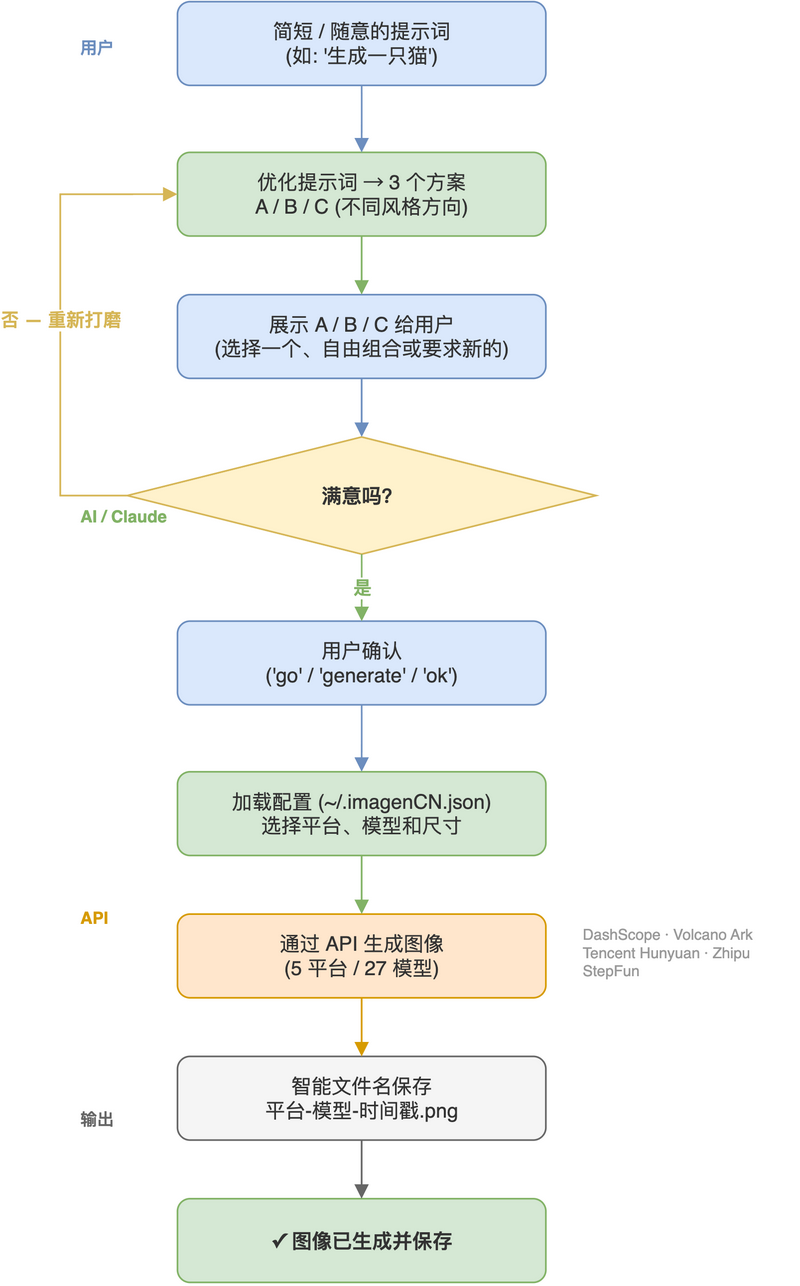
自然语言生成高质量图像的 Claude Code / OpenClaw 技能,支持阿里云百炼、字节火山方舟、腾讯混元、智谱 BigModel、阶跃星辰以及 Google Gemini 六大平台。
📋 模型参考 — 浏览全部 31 个模型,含价格、分辨率、功能对比。
工作流程
特性
- 阿里云百炼 (DashScope): 通义千问 2.0、编辑版、万相系列、Z-Image — 共 21 个模型
- 字节火山方舟: 豆包 Seedream 系列 (5.0/4.5/4.0) — 3 个模型,最高 4K
- 腾讯混元: 混元生图 3.0 — 旗舰模型,复杂中文语义理解
- 智谱 / BigModel: CogView-4、GLM-Image — 3 个模型,图片中直接渲染中文文字
- 阶跃星辰: Step-2X、Step-Image-Edit-2 — 2 个模型,超低价批量生成
- Google Gemini(国际平台): Gemini 3 Pro Image — 1 个模型,512/1K/2K 及比例预设
- 多种尺寸预设: 1:1, 16:9, 9:16, 4:3, 3:4,以及 1K/2K/3K/4K
- 跨平台: 支持 Windows, macOS, Linux
- 多区域 API: 中国(默认)、新加坡、弗吉尼亚(DashScope)
安装
Claude Code 插件市场(推荐)
/plugin install imagenCN@365-skills
或者告诉你的 coding agent:
help me to install https://github.com/Agents365-ai/imagenCN.git
手动安装
# 全局安装
git clone https://github.com/Agents365-ai/imagenCN.git ~/.claude/skills/imagenCN

# 仅当前项目
git clone https://github.com/Agents365-ai/imagenCN.git .claude/skills/imagenCN
OpenClaw
git clone https://github.com/Agents365-ai/imagenCN.git skills/imagenCN
SkillsMP
在 skillsmp.com 搜索 imagenCN,一键安装。
系统要求
环境要求
- Python 3.8+
- pip
安装依赖
pip install dashscope requests
API 密钥
# 阿里云百炼 (DashScope)
export DASHSCOPE_API_KEY="your_api_key"
# 获取密钥: https://bailian.console.aliyun.com/

# 字节火山方舟(可选)
export ARK_API_KEY="your_api_key"
# 获取密钥: https://console.volcengine.com/ark/region:ark+cn-beijing/apikey

# 腾讯混元(可选)
export HUNYUAN_API_KEY="your_api_key"
# 获取密钥: https://console.cloud.tencent.com/tokenhub/apikey

# 智谱 / BigModel(可选)
export ZHIPUAI_API_KEY="your_api_key"
# 获取密钥: https://bigmodel.cn

# 阶跃星辰(可选)
export STEP_API_KEY="your_api_key"
# 获取密钥: https://platform.stepfun.com/interface-key

# Google Gemini(可选,国际平台)
export GEMINI_API_KEY="your_api_key"
# 获取密钥: https://aistudio.google.com/
配置文件(可选)
创建 ~/.imagenCN.json 设置个人默认值:
{"platform": "ark", "model": "doubao-seedream-5-0-260128", "size": "2K"}
项目级 .imagenCN.json 优先级高于用户级。命令行参数覆盖两者。
可选环境变量
# 各平台默认模型
export DASHSCOPE_MODEL="wan2.7-image-pro"       # DashScope 默认
export ARK_MODEL="doubao-seedream-5-0-260128"   # 火山方舟默认
export HUNYUAN_MODEL="hy-image-v3.0"            # 腾讯混元默认
export ZHIPUAI_MODEL="cogview-4"                # 智谱默认
export STEP_MODEL="step-2x-large"               # 阶跃星辰默认
export GEMINI_MODEL="gemini-3-pro-image-preview" # Google Gemini 默认

# 设置 API 端点(仅 DashScope,默认: cn)
export DASHSCOPE_API_BASE="cn"  # 或 "sg", "us", 或完整 URL
快速开始
自然语言(Claude Code)
直接告诉 Claude 你想要什么:
生成一只可爱的橘猫图片
创建一张带有"新年快乐"文字的海报
用 wan2.7-image-pro 生成一张 4K 的山间日落照片
生成一张 16:9 的风景壁纸
命令行
# 基本用法(默认模型: qwen-image-2.0-pro,原生 2K)
python scripts/generate_image.py "一只可爱的猫咪" output.png

# 使用 Wan2.7 模型生成 4K 写实图像 (DashScope)
python scripts/generate_image.py --model wan2.7-image-pro --size 4K "山间日落" photo.png

# 火山方舟(字节跳动)— 需 ARK_API_KEY
python scripts/generate_image.py --platform ark "时尚杂志封面风格人像" portrait.png

# 腾讯混元 — 需 HUNYUAN_API_KEY
python scripts/generate_image.py --platform hunyuan "月球上骑马的宇航员,电影级光影" scifi.png

# Google Gemini(国际平台)— 需 GEMINI_API_KEY
python scripts/generate_image.py --platform gemini "清晨柔光下的日式庭院" garden.png

# 编辑已有图片(需 --image)
python scripts/generate_image.py --model qwen-image-edit-max --image input.png "把背景换成海滩日落" edited.png

# 使用负面提示词
python scripts/generate_image.py --negative "模糊" "高质量人像" portrait.png

# 列出六大平台全部模型
python scripts/generate_image.py --list-models
模型
| 模型 | 最佳用途 |
|---|---|
qwen-image-2.0-pro |
默认,最新旗舰,原生 2K,最强字体与细节 |
qwen-image-2.0-pro-2026-06-22 |
最新快照版(2026 年 6 月),生成与编辑能力融合 |
qwen-image-2.0 |
标准 2.0 版本,原生 2K |
qwen-image-max |
上代旗舰 |
qwen-image-max-2025-12-30 |
qwen-image-max 快照版,写实感增强、AI 痕迹更少 |
qwen-image-plus |
蒸馏加速版 |
qwen-image-plus-2026-01-09 |
qwen-image-plus 快照版(2026 年 1 月) |
qwen-image-edit-max |
旗舰图像编辑模型(需 --image) |
qwen-image-edit-max-2026-01-16 |
最新编辑快照版(2026 年 1 月) |
qwen-image-edit-plus |
快速低成本图像编辑 |
qwen-image |
基础版 |
wan2.7-image-pro |
最新写实模型,最高 4K 输出 |
wan2.7-image |
Wan 2.7 标准版,最高 2K |
wan2.6-t2i |
Wan 2.6,灵活尺寸 |
wan2.5-t2i-preview |
高质量艺术作品 |
wan2.2-t2i-flash |
快速生成 |
wan2.2-t2i-plus |
专业级 |
wanx2.1-t2i-turbo |
快速执行 |
wanx2.1-t2i-plus |
专业级 |
wanx2.0-t2i-turbo |
早期版本 |
z-image-turbo |
轻量快速、低成本;人像和商品图 |
doubao-seedream-5-0-260128 |
字节最新旗舰,最高 3K,PNG/JPEG,最强文字渲染 |
doubao-seedream-4-5-251128 |
字节 Seedream 4.5,最高 4K |
doubao-seedream-4-0-250828 |
字节 Seedream 4.0,高性价比 4K |
hy-image-v3.0 |
腾讯混元旗舰,复杂中文语义理解,最高支持千字级 prompt |
cogview-4 |
智谱 CogView-4,图片中直接渲染中文文字 |
cogview-4-250304 |
CogView-4 固定快照版(2025年3月),可复现结果 |
glm-image |
智谱 GLM-Image 旗舰,最高 2048×2048 |
step-2x-large |
阶跃星辰 Step-2X 高品质,0.1 元/张 |
step-image-edit-2 |
阶跃星辰超低价,0.02 元/张,支持负面提示词 |
gemini-3-pro-image-preview |
Google Gemini 旗舰(国际平台),支持 512/1K/2K 及比例预设 |
尺寸预设
通义千问 2.0(原生 2K):
1:1→ 2048×2048(默认)16:9→ 2688×15369:16→ 1536×26884:3→ 2304×17283:4→ 1728×23041K→ 1024×10242K→ 2048×2048
通义千问经典版:
1:1→ 1328×132816:9→ 1664×9289:16→ 928×16644:3→ 1472×11043:4→ 1104×1472
Z-Image(像素面积 512×512 至 2048×2048):
1:1→ 1024×1024(默认)16:9→ 1280×7209:16→ 720×12802:3→ 1024×15363:2→ 1536×1024
通义万相(Wan2.7 还支持 1K/2K/4K):
1:1→ 1024×10241:1-large→ 1280×128016:9→ 1280×7209:16→ 720×12804:3→ 1200×9003:4→ 900×12002:1→ 1440×720
火山方舟 (Seedream):
1:1→ 2048×204816:9→ 2848×16009:16→ 1600×28484:3→ 2304×17283:4→ 1728×23041K/2K/3K/4K(取决于模型)
腾讯混元(冒号分隔格式):
1:1→ 1024:102416:9→ 1920:10809:16→ 1080:19204:3→ 1600:12003:4→ 1200:16003:2→ 1920:12802:3→ 1280:1920
智谱 (CogView-4 / GLM-Image):
1:1→ 1024x1024(默认)16:9→ 1344x7689:16→ 768x13444:3→ 1152x8643:4→ 864x11522:1→ 1440x7201:2→ 720x1440
阶跃星辰 (Step-2X):
1:1→ 1024x1024(默认)1:1-small→ 512x51216:9→ 1280x8009:16→ 800x1280
Google Gemini(命名尺寸 + 宽高比):
512/1K(默认)/2K→ 命名输出尺寸1:1,16:9,9:16,4:3,3:4→ 宽高比(不支持精确像素尺寸)
API 端点
| 地区 | 别名 | URL |
|---|---|---|
| 中国(默认) | cn |
https://dashscope.aliyuncs.com/api/v1 |
| 新加坡 | sg |
https://dashscope-intl.aliyuncs.com/api/v1 |
| 弗吉尼亚 | us |
https://dashscope-us.aliyuncs.com/api/v1 |
支持
如果这个项目对你有帮助,欢迎支持作者:

微信支付 |

支付宝 |

Buy Me a Coffee |

打赏作者 |
作者
Agents365-ai
- Bilibili: https://space.bilibili.com/441831884
- GitHub: https://github.com/Agents365-ai
许可证
CC BY-NC 4.0 — 非商业用途免费。商业使用需获得授权。